


The Ultimate Shopify SEO Checklist: 42 Steps to Rank Your Store in 2026
 Gaurav Jat

Summarize this blog post with:
TL;DR
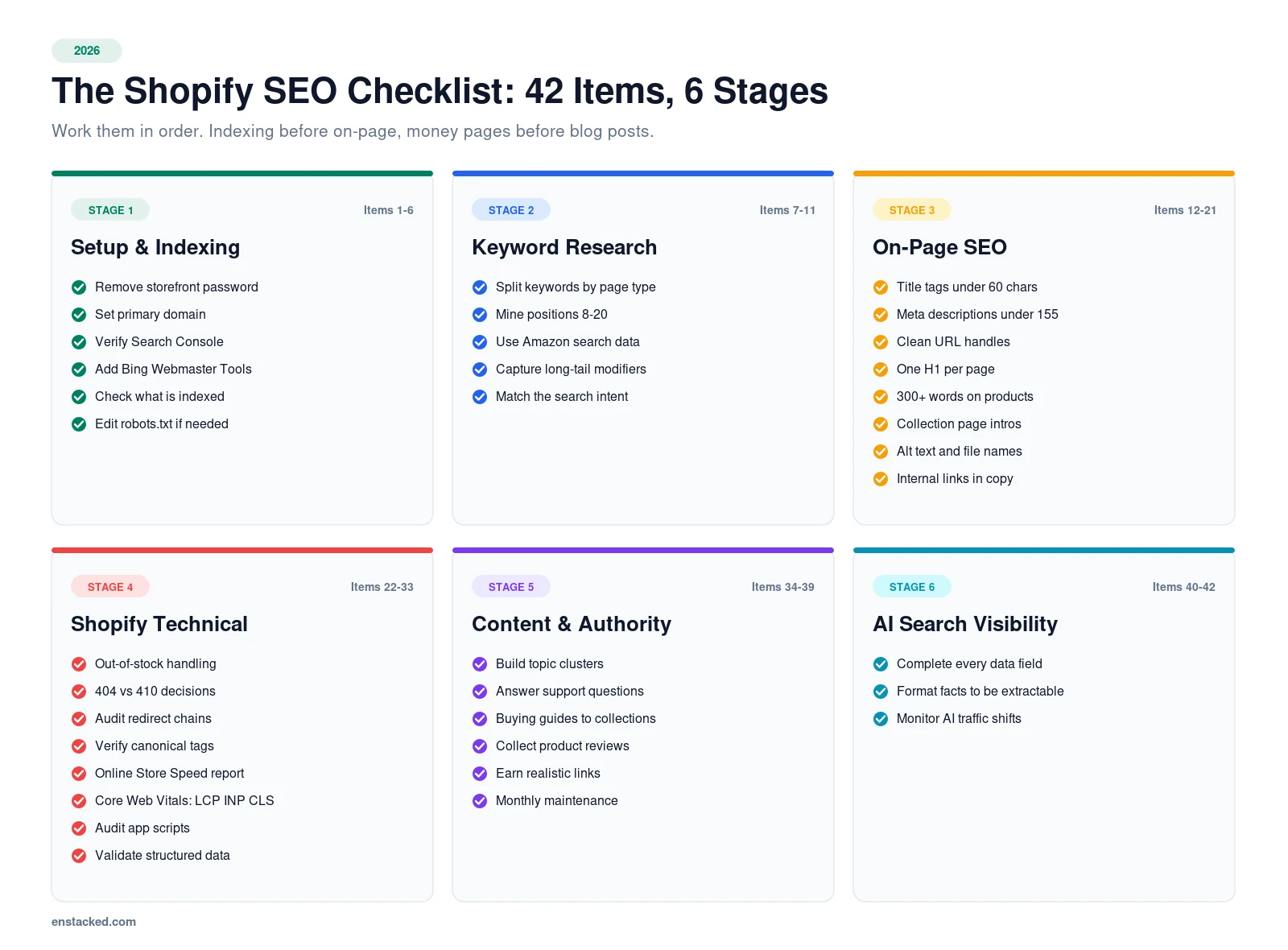
This Shopify SEO checklist has 42 items across six stages: setup, keyword research, on-page SEO, Shopify-specific technical fixes, content, and AI search visibility.
Work them in order. Fix crawling and indexing blockers first, then your money pages, then content and links.
Most of it is done inside your Shopify admin, and the exact paths are included for each step.
Introduction
Most Shopify SEO checklists are generic website advice with the word “Shopify” added. They tell you to write good title tags.
They do not tell you that Shopify creates a second URL for every product inside a collection, or which admin screen actually controls your meta description.
This one is different. Every item below is either Shopify-specific or includes the exact admin path to complete it.
It is organised by priority, not by category, because fixing a noindex tag matters more than perfecting alt text.
If you want the wider strategic frame first, start with our eCommerce SEO strategy guide, then come back and work this list.
Around 50% of consumers already use AI-powered search, and it is expected to influence $750 billion in consumer spending by 2028.
That last point changes what an SEO checklist has to cover in 2026, so there is a full stage on AI search visibility at the end.
Stage 1: Shopify SEO Setup Checklist (Indexing and Crawling First)
Nothing else matters if Google cannot crawl or index your store.
1. Remove the storefront password
A password-protected store cannot be indexed. Check Online Store > Preferences and confirm password protection is off.
This sounds obvious. It is also the single most common reason a new store has zero organic traffic.
2. Set your primary domain and force one version
Go to Settings > Domains. Set one primary domain and enable redirects for all others.
Without this, search engines can see example.com, www.example.com, and your .myshopify.com address as separate sites splitting the same authority.
3. Verify your store in Google Search Console
Search Console is where you will diagnose everything from here on. Add your property, verify by DNS or the HTML tag in your theme, and submit your sitemap.
Your sitemap is always at yourstore.com/sitemap.xml and it generates automatically.
4. Set up Bing Webmaster Tools too
Bing powers Copilot and feeds several AI assistants. It takes five minutes and imports directly from Search Console.
In 2026 this is no longer optional, because AI answer engines lean on Bing’s index more than most merchants realise.
5. Check what is actually indexed
Search site:yourstore.com in Google and compare the count with your product total.
Then open Indexing > Pages in Search Console. “Discovered, currently not indexed” on product pages usually means thin content or weak internal linking, not a technical fault.
6. Edit robots.txt if you need to
Older guides claim Shopify’s robots.txt cannot be edited. That has not been true since 2021.
Go to Online Store > Themes > Edit code and add a robots.txt.liquid template. Only do this if you have a specific crawl-budget problem. The default is sensible for most stores.
Pro Tip
Do not block /collections/ filtered URLs with robots.txt on instinct. Shopify already handles most faceted URL bloat. Blocking crawl access removes Google’s ability to see the canonical tag.
Stage 2: Shopify Keyword Research Checklist
7. Separate your keywords by page type
This is the step most stores skip, and it causes keyword cannibalisation later.
- Collection pages target broad category terms: “women’s running shoes”.
- Product pages target specific and branded terms: “Nike Pegasus 41 women’s”.
- Blog posts target informational terms: “how to choose running shoes”.
Map one primary keyword to one page. If two pages target the same term, you are competing with yourself.
8. Mine Search Console for existing opportunities
Your fastest wins are already in your data. In Search Console, open Performance and filter for queries where you rank between positions 8 and 20.
Those pages already have relevance. A better title, more content, and three internal links often move them onto page one without any new content.
9. Use marketplace search data
Around half of US product searches start on Amazon rather than Google. Amazon and eBay autocomplete reveal the exact phrasing buyers use, which is often different from what keyword tools report.
Type your product category into Amazon’s search bar and note every suggestion.
10. Capture long-tail buying modifiers
Long-tail keywords convert better because intent is clearer. Build variations around: material, fit, use case, size, colour, price bracket, and “for” phrases.
“Waterproof hiking boots for wide feet” will outconvert “boots” every single time.
11. Check search intent before you commit
Google your target keyword and look at what ranks. If the first page is all blog posts, a product page will not rank there no matter how well optimised it is.
Match the page type to what Google is already rewarding.
Stage 3: Shopify On-Page SEO Checklist (Your Money Pages First)
12. Write unique title tags under 60 characters
In your admin, go to any product and click Edit website SEO at the bottom of the page.
Shopify defaults to your product name, which wastes the space. Add the qualifiers buyers search: brand, material, size, use case.
13. Write meta descriptions under 155 characters
Meta descriptions do not directly affect rankings. They heavily affect click-through rate, which does.
Include the keyword, a differentiator, and a reason to click: free shipping, in stock, next-day delivery.
14. Clean up your URL handles
Same Edit website SEO panel. Keep handles short, lowercase, hyphenated, and free of stop words.
When you change a handle on a live URL, tick Create a URL redirect. Shopify will not do it automatically and you will lose the rankings.
15. Use exactly one H1 per page
On product pages the H1 should be the product name. Many themes get this wrong and wrap the logo in an H1 instead.
Check by right-clicking your page, selecting Inspect, and searching for <h1.
16. Get real content onto product pages
Aim for 300 words or more of genuinely unique copy. Never use the manufacturer’s description, because every competitor selling that product has the identical text.
Structure it as: what it is, who it suits, materials and specs, sizing notes, and answers to the three questions your support team gets most.
17. Write proper collection page intros
Collection pages are your highest-value SEO real estate and most stores leave them empty.
Add 150 to 300 words above or below the grid that helps someone choose, then link to your subcategories and best sellers.
18. Add descriptive alt text to every image
Click any product image in the admin and select Add alt text. Describe the image for someone who cannot see it, and include the keyword only where it fits naturally.
19. Rename image files before uploading
Shopify keeps your original filename. Upload merino-wool-crew-sock-grey.jpg, never IMG_4471.jpg.
This one is unrecoverable after upload without re-uploading the asset, so build the habit now.
20. Compress images and use modern formats
Some checklists still recommend PNG for product photos. That advice is a decade old.
Shopify serves WebP automatically to supporting browsers, but it does not compress your original. Compress before upload, and keep product photos under roughly 200KB.
21. Add internal links inside product descriptions
Link from product descriptions to related collections, size guides, and relevant blog posts. Use descriptive anchor text, never “click here“.
This is the highest-leverage and most ignored item on this entire checklist.
Pro Tip
Internal links should point to the clean /products/handle URL, not the /collections/name/products/handle version. Consistency here strengthens the canonical signal.
Stage 4: Shopify Technical SEO Checklist (Platform-Specific Fixes)
This is the stage that separates a Shopify checklist from a generic one.
22. Handle out-of-stock products correctly
Never unpublish a temporarily out-of-stock product. That kills the URL, produces a 404, and destroys rankings you spent months earning.
Instead, keep the product live, show the stock status, add a back-in-stock alert, and push it to the bottom of the collection.
23. Use 404 or 410 for discontinued products
When a product is genuinely gone forever, let the URL 404 or 410. Only redirect when a genuinely equivalent replacement exists.
Mass-redirecting dead products to your homepage is treated as a soft 404 and helps nobody.
24. Audit your URL redirects
Go to Online Store > Navigation > URL Redirects. Look for redirect chains where A points to B points to C.
Collapse every chain so each old URL points directly at its final destination.
25. Fix thin and duplicate collection pages
Automated collections can generate near-identical pages. If two collections return substantially the same products, merge them and redirect one.
26. Check your theme’s canonical tags
Shopify outputs canonicals by default, but heavily customised themes sometimes break them. View source on a product page and confirm rel="canonical" points at the clean product URL.
27. Watch your variant URLs
Variant selections append parameters like ?variant=123456. These should canonicalise back to the parent product.
If you sell products with many options, our guide to Shopify’s variant limit covers the structural side of this.
28. Run the Online Store Speed report
Go to Online Store > Themes > Online store speed. It benchmarks you against comparable Shopify stores using Lighthouse.
Treat it as a direction indicator rather than a target. Chasing a perfect score is wasted effort.
29. Fix Core Web Vitals in Search Console
The thresholds Google considers good on mobile are LCP under 2.5 seconds, INP under 200 milliseconds, and CLS under 0.1.
Note that INP replaced First Input Delay in March 2024. If your notes still mention FID, they are out of date.
30. Audit your installed apps
Every app injects scripts that run on every page load. Uninstall anything unused, then check whether leftover code remained in your theme. It usually does.
Our roundup of the best Shopify plugins flags the lightweight options.
31. Choose a fast, SEO-ready theme
Your theme sets the performance ceiling that no app can raise. See our picks for the fastest Shopify themes.
32. Confirm mobile experience, not just responsiveness
Google indexes with a smartphone crawler, so the mobile version of your page is the version being ranked.
Google retired the Mobile Usability report in Search Console in late 2023, so test with Lighthouse in mobile mode and on a real device instead. Our Shopify mobile optimization guide covers the full process.
33. Validate your structured data
Shopify themes usually output Product schema by default, but customization breaks it often.
Test with Google’s Rich Results Test. Note that the old Structured Data Testing Tool has been deprecated, so ignore guides still pointing at it.
Priority schema types for a store: Product, BreadcrumbList, Organization, and FAQPage where you have genuine FAQs.
Stage 5: Shopify Content and Link Building Checklist
34. Build topic clusters, not scattered posts
Pick your core commercial themes and write a cluster around each: one comprehensive guide plus several supporting posts, all interlinked and all pointing to the relevant collection page.
Random blog posts on unrelated topics generate traffic that never converts.
35. Answer real customer questions
Your support inbox is a free keyword tool. Every repeated question is a search query someone typed into Google first.
36. Create buying guides that link to collections
“Best X for Y” and “how to choose X” posts capture upper-funnel search and pass authority straight to your commercial pages.
37. Collect and display product reviews
Reviews add unique content to product pages, feed review schema, and improve conversion. They also address the trust signals Google’s quality guidelines care about.
Our roundup of Shopify apps that increase conversions and sales covers the review tools worth running.
38. Earn links you can actually get
Forget generic outreach. For a store, the realistic sources are supplier and stockist pages, local press, industry roundups, product seeding to creators, and original data nobody else has published.
39. Keep a maintenance rhythm
Monthly: check Search Console coverage errors, broken links, and traffic drops. Quarterly: full audit and refresh your top pages.
SEO decays. Competitors publish, Google updates, and pages go stale.
Rankings only pay off if the traffic converts, so pair this with our Shopify CRO best practices.
Stage 6: Shopify AI SEO Checklist (New for 2026)
Nobody ranking for this keyword covers this properly, and it is where the growth is.
When a shopper asks an assistant for “waterproof hiking boots under $150”, something has to surface your product. That something is structured product data, not your blog.
40. Complete every product data field
Size, colour, material, GTIN, availability, and delivery estimates give AI agents the context to represent your products accurately.
Shopify reports that AI searches powered by its Catalog convert at twice the rate of those using scraped data. Structured beats scraped, and completeness is what makes data structured.
41. Format content so facts are extractable
AI systems cite content they can parse cleanly. Use specific subheadings phrased as questions, short paragraphs, comparison tables, bulleted specs, and a real FAQ section.
Front-load the answer, then explain. A page that buries its answer in paragraph six will not get cited.
42. Monitor AI-driven traffic changes
Search Console does not yet separate AI Overview clicks from classic organic. Use it as a proxy instead: look for pages where impressions hold steady but click-through rate falls, especially on informational queries.
That pattern usually means an AI Overview is answering the query above your result.
For the wider strategic picture, see our guide to Shopify’s agentic commerce and what shipped in the Shopify Spring ’26 Edition.
Want this audited and implemented properly?
Hire Dedicated Shopify Developers
What to Fix First if You Only Have a Week
- Day 1: Confirm indexing. Password off, primary domain set, sitemap submitted, coverage errors reviewed.
- Day 2: Fix out-of-stock handling and audit redirect chains.
- Day 3: Rewrite titles and meta descriptions for your top 20 revenue pages.
- Day 4: Write real content on your top 5 collection pages.
- Day 5: Add internal links from blog posts and product descriptions to those collections.
- Day 6: Compress images, fix alt text, validate structured data.
- Day 7: Pull your Search Console position 8 to 20 list and plan next month around it.
Summing It Up
Shopify gives you a solid SEO foundation, then leaves you three specific problems to manage: duplicate product URLs, out-of-stock handling, and app-driven page speed.
Work this checklist in stage order. Indexing before on-page, money pages before blog posts, and data completeness before content volume.
The 2026 addition is real. Structured, complete product data is now what determines whether AI assistants can surface your catalog, and that channel converts better than the scraped alternative.
If you would rather have this audited and implemented by a team that works on Shopify every week, we can help. As an Shopify development service company, we will tell you what is actually costing you rankings
before recommending anything.
Book a Free Consultation
Frequently Asked Questions (FAQs)
Is Shopify good for SEO?
Yes. Shopify handles SSL, sitemaps, canonical tags, and CDN delivery automatically, which covers a lot of technical SEO out of the box.
Its limits are fixed URL prefixes you cannot remove, duplicate product URLs inside collections, and a basic blog CMS. None of these prevent ranking.
How long does Shopify SEO take to show results?
Technical fixes such as indexing errors and redirects can show within weeks. Content and link-driven gains usually take three to six months.
New stores take longer because they have no domain authority yet. Internal linking and technical cleanup are the fastest levers early on.
Where do I edit meta titles and descriptions in Shopify?
Open any product, collection, page, or blog post and scroll to Edit website SEO at the bottom.
For your homepage, go to Online Store > Preferences instead.
How do I fix duplicate content on Shopify?
Most Shopify duplication comes from products being reachable through collection URLs. Shopify canonicalises this automatically, so verify the canonical tag is intact rather than trying to block the URLs.
Then make sure your internal links point consistently at the clean /products/handle URL.
Should I unpublish out-of-stock products on Shopify?
No. Unpublishing kills the URL and creates a 404, losing whatever rankings that page had.
Keep it published, show the stock status, offer a back-in-stock alert, and sort it to the bottom of the collection. Only let a URL 404 when the product is discontinued permanently.
Can I edit the robots.txt file on Shopify?
Yes. Since 2021 you can add a robots.txt.liquid template through Online Store > Themes > Edit code.
Most stores should leave the default alone. Only customise it if you have a specific crawl-budget problem you can evidence.
Do I need a Shopify SEO app?
Not for the basics. Titles, descriptions, URL handles, alt text, and sitemaps are all handled natively in the admin.
Apps help with bulk editing, broken-link monitoring, and schema on customised themes. Every app also adds scripts, so install deliberately.
How many words should a Shopify product description be?
Aim for 300 words or more of unique copy on pages you want to rank. Length is not a ranking factor by itself, but thin pages rarely earn rankings on competitive terms.
Never publish the manufacturer’s description, since every competitor selling that product has the same text.
How do I optimise my Shopify store for AI search?
Complete every product data field, keep inventory and pricing accurate in real time, and format content so facts are easy to extract using clear subheadings, specs lists, and genuine FAQs.
AI assistants surface structured product data rather than marketing copy, so completeness matters more than word count here.
Does page speed affect Shopify SEO?
Yes, through Core Web Vitals and indirectly through bounce rate and conversion. Target LCP under 2.5 seconds, INP under 200 milliseconds, and CLS under 0.1 on mobile.
On Shopify the two biggest causes of slow pages are heavy themes and accumulated app scripts.

- Recover Lost Sales
- Boost Conversions
- Reduce Abandonment
- Faster Store
📘 FREE REPORT
The Shopify Revenue Leaks Report
Discover the hidden mistakes silently costing Shopify stores thousands every month—and learn exactly how to fix them.
Instant access • No spam • Unsubscribe anytime.