


Top 10 Mistakes in Web Design That Are Costing You Users (And How to Fix Them!)
 Khushi Prajapati

Summarize this blog post with:
TL;DR
The biggest website design mistakes costing you users are slow load speed, cluttered layouts, weak CTAs, non-mobile-friendly design, intrusive pop-ups, generic stock images, inconsistent branding, poor readability, neglected accessibility, and ignoring SEO, and fixing each one directly improves trust, conversions, and search rankings.
Introduction
Your website is often the first impression potential customers have of your business. But if it’s cluttered, slow, or difficult to navigate, visitors will leave fast. And when they leave, you lose potential sales, leads, and credibility.
Did you know, according to research on first impressions and visual design, 94% of the time, users focus on a website’s design to form an opinion.
Poor web design doesn’t just frustrate users. It directly impacts your bottom line. Slow-loading pages increase bounce rates, weak CTAs reduce conversions, and non-mobile-friendly designs drive away over half of your potential audience.
Pro Tip: Read 20+ Interesting UI/UX Statistics
But don’t worry, fixing these common website design mistakes isn’t rocket science. It’s all about understanding what to do and what to avoid.
In this blog, we’ll break down the top 10 mistakes in web design, so you can design a website that your users and search engines love.
Common Mistakes in Website Design: What Are They & How to Avoid Them?
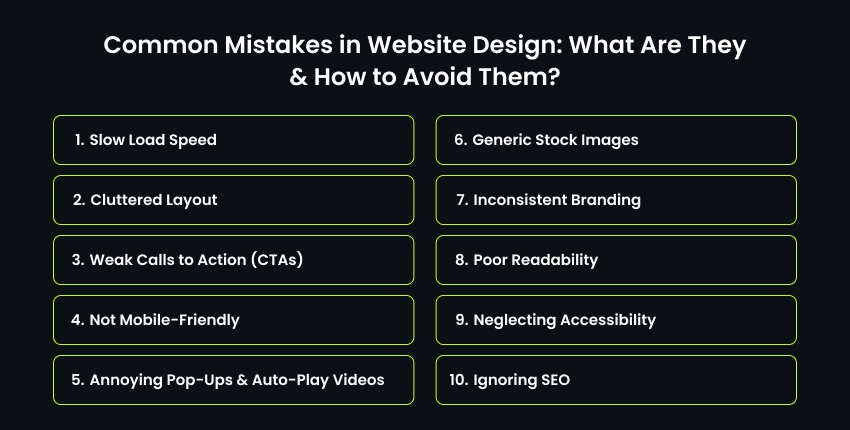
1️⃣ Slow Load Speed – Losing Customers Before They Even Arrive
Users are impatient. So, slow loading speed is one of the top website design mistakes to avoid.
It takes just 0.05 seconds for users to form an opinion about your website. And once they leave, they’re unlikely to come back.
Plus, search engines hate slow websites. Google factors speed into rankings, meaning slow-loading sites rank lower, giving your competitors an easy win.
How to Fix It?
✔ Compress images using tools like TinyPNG.
✔ Use a Content Delivery Network (CDN) to speed up loading worldwide.
✔ Minimize unnecessary scripts, plugins, and redirects.
✔ Choose a reliable hosting provider with fast server response times.
2️⃣ Cluttered Layout – Overloading Visitors with Too Much Information
Another web design mistake to avoid is a messy, overcrowded website.
It is like a chaotic store: customers walk in, feel overwhelmed, and walk out. Users need a clear visual hierarchy to find what they need quickly.
Otherwise, they leave confused, and you lose a potential sale.
Studies show that conversions can drop by up to 95% if a webpage is cluttered or has too many elements.

How to Fix It?
✔ Prioritize important content by placing key elements in visible areas.
✔ Use whitespace strategically to create breathing room.
✔ Keep navigation simple and intuitive (avoid excessive dropdowns).
✔ Use clear labels (instead of “Products,” say “Men’s Shoes” or “Skin Care”).
✔ Place a search bar in a prominent location for easy access.
3️⃣ Weak Calls to Action (CTAs) – Missing Out on Conversions
If your CTA says “Learn More” or “Click Here,” you’re not guiding users toward action. Vague CTAs are a top website design mistake to avoid that could confuse visitors, reducing conversions.
Did you know, according to HubSpot’s Call-to-Action Statistics, a deep dive into over 330,000 CTAs over six months revealed that personalized CTAs have a conversion rate that’s 202% better than one-size-fits-all CTAs.
Tips to fix it:
✔ Use action-driven language: instead of “Learn More,” say “Download Free Guide.”
✔ Write targeted CTAs as per your target audience.
✔ Make CTAs stand out visually with contrasting colors.
✔ Test CTA placements, sometimes a simple repositioning can boost conversions.
4️⃣ Not Mobile-Friendly – Ignoring Over Half Your Visitors
According to Statcounter’s Desktop vs Mobile Market Share Worldwide report, over 60% of all web traffic comes from mobile devices, yet another common web design mistake is that these sites still break on smaller screens.
If your site isn’t mobile-friendly, users struggle to navigate, pinch-zoom, or deal with unclickable buttons, then they leave.
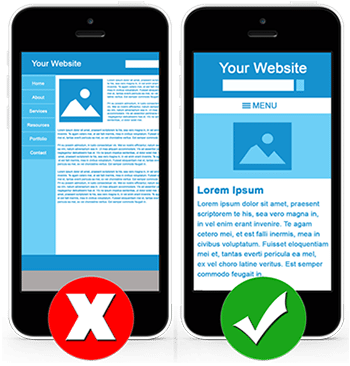
Even worse? Google penalizes non-mobile-friendly sites, pushing them lower in search rankings.
How to Fix It?
✔ Use responsive design so your website adapts to any screen.
✔ Ensure buttons and links are easy to tap on mobile.
✔ Test your site using Google’s Mobile-Friendly Test.
Read about: Adaptive vs Responsive Design
5️⃣ Annoying Pop-Ups & Auto-Play Videos – Driving Users Away Instantly
Nothing ruins the user experience faster than a full-screen pop-up the second someone lands on a page. A huge website design mistake to avoid.
An even bigger mistake? A loud auto-play video. Users will either close the tab immediately or install ad blockers, meaning you lose conversions and engagement.

Here’s How to Fix It?
✔ Use exit-intent pop-ups instead of immediate ones.
✔ Offer value in pop-ups (discounts, free guides).
✔ Never auto-play videos with sound, give users control.
6️⃣ Generic Stock Images – Killing Authenticity
We are in 2025, and who still uses stock images? People can spot generic stock photos instantly, making your business seem unprofessional.
According to Marketing Experiments research on stock photography, real images perform 35% better than stock images and contribute to higher user engagement and trust.
So make sure to avoid this top website design mistake of stuffing your site with stock images.
Here’s how you can fix it:
✔ Invest in high-quality custom media.
✔ If using stock images, pick less common, natural-looking photos.
✔ Use team photos or customer testimonials to build authenticity.
7️⃣ Inconsistent Branding – Weakening Your Identity and Trust
Branding is more than just a logo. It’s the visual and emotional connection your audience has with your business.
And if your website makes the common web design mistake of using different fonts, colors, and logo placements, then visitors will struggle to recognize your brand.
How to Fix It?
✔ Create a Brand Style Guide to ensure uniformity across all pages.
✔ Use the same logo and color scheme consistently to match your branding.
✔ Maintain consistent typography, a primary font for headlines and a secondary font for body text, and avoid changing them across different pages.
8️⃣ Poor Readability – Straining Visitors’ Eyes and Losing Engagement
Another top website design mistake is not following the proper visual hierarchy, contrast, fonts, or stuffing too many decorative elements that make reading difficult.
If visitors struggle to read your content, they won’t stick around. Small, consistent micro-interactions, like hover states and subtle animations, can also guide the eye without adding visual noise.
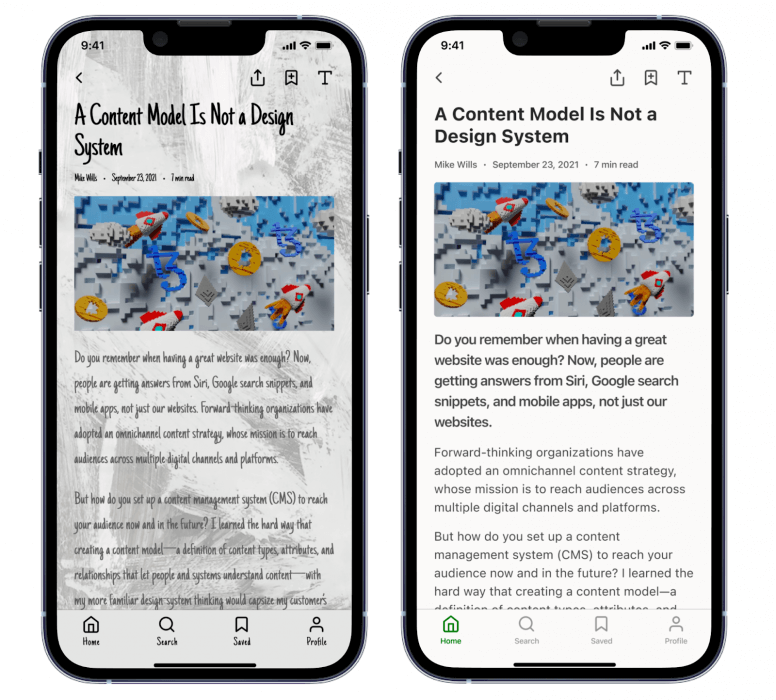
Here’s How to Fix It?
✔ Choose a readable font that is easier to read on screens.
✔ Set proper font sizes. For example, use at least 16px for body text, with larger sizes for headings.
✔ Improve line spacing for better readability.
✔ Use high contrast for better legibility.
9️⃣ Neglecting Accessibility – Excluding a Huge Audience
Web accessibility ensures all users, including those with disabilities, can navigate your site. Many businesses make this common web design mistake, alienating millions of potential customers who may have visual impairments, mobility issues, or other disabilities.
According to the Click-Away Pound Survey, 71% of users with disabilities leave an inaccessible site immediately.
Here’s How to Fix It?
✔ Use alt text for images to describe images clearly for screen readers.
✔ Ensure keyboard-friendly navigation, not just a mouse.
✔ Provide captions for videos for users who are deaf or in sound-sensitive environments.
✔ Improve color contrast to ensure text and background colors have sufficient contrast for readability.
? Ignoring SEO – Making Your Site Invisible
A beautiful website is useless if no one can find it. According to HubSpot’s Google Search Statistics, 75% of users never scroll past the first page of search results.
So, if you’ve made the website design mistake of avoiding SEO optimization, you’re making it harder for Google and other search engines to index and rank your site. Ultimately, you’re invisible to most users.
How to Fix It?
✔ Avoid long, messy URLs, use clear, keyword-rich URLs instead.
✔ Optimize images by compressing them to reduce load time while keeping quality intact.
✔ Use responsive design, as Google responsiveness and accessibility are major ranking factors.
✔ Structure content properly for better readability and SEO performance.
Final Thoughts
Your website is more than just a digital presence. It’s your most powerful sales and engagement tool. Every small tweak adds up to a site that keeps visitors engaged and drives real results for your business.
The takeaway? Web design isn’t just about aesthetics; it’s about functionality, user experience, and business growth. So, take a step back, audit your site, and start making improvements today. Your visitors (and your bottom line) will thank you.
By fixing these top 10 mistakes in web design, you’re not just improving design, you’re enhancing user experience, increasing trust, and boosting conversions.
If you need professional assistance with optimizing your website design or building one from scratch, without the mistakes, our UX/UI Design Services Company can help you out.

- Recover Lost Sales
- Boost Conversions
- Reduce Abandonment
- Faster Store
📘 FREE REPORT
The Shopify Revenue Leaks Report
Discover the hidden mistakes silently costing Shopify stores thousands every month—and learn exactly how to fix them.
Instant access • No spam • Unsubscribe anytime.