




Summarize this blog post with:
Introduction
A shopper adds a $32 pour-over dripper to their cart. They’ll need paper filters to use it, and maybe a bag of coffee beans too. But if your store never suggests either, they check out with one item and buy the filters somewhere else.
That missed sale is what EnKart is here to catch. It’s our new Shopify upsell app, and it’s now live on the Shopify App Store. It suggests the right extra item on the product page, in the cart and after payment, and it’s free until your offers bring in $500 every 30 days.
Here’s what it does, what it costs and how to set it up before Black Friday.
What Is EnKart?
EnKart is an upsell app for Shopify built by Enstacked Technologies. It helps merchants raise average order value (AOV) by showing offers at the moments shoppers decide: under Add to cart, in the cart drawer and on the cart page, in an optional pop-up, and after payment.

You choose what each offer shows. Pick products yourself, use Shopify’s recommendations, or let EnKart suggest pairs from your own orders. Discounts apply at checkout automatically, so there are no codes to create.
And because EnKart works through Shopify’s theme editor, you don’t need a developer or any theme code to set it up.
Why We Built Another Upsell Shopify App
We kept seeing the same four problems on client stores:
- Fees with no sales. Stores paid fees in months when no upsell sold.
- Ghost code. Removed apps left code behind in the theme. Shopify’s own developer docs say this leftover code causes quality and performance issues.
- Too much data access. Apps asked for customer data that an offer widget doesn’t need.
- Inflated dashboards. Upsells got credit for revenue the offer didn’t earn.
So we built the upsell Shopify app we wanted to install on our own clients’ stores.
8 Offer Types, All on Every Plan
Every plan, even Free, includes all eight offer types. Here’s how each one works for a coffee gear store selling a $48 pour-over kettle.
| Offer type | What the shopper sees | Use it when | Our take |
|---|---|---|---|
| Cross-sell | A matching grinder below Add to cart | Two products are used together | Start here |
| Bundles | The kettle and a scale at one set price | You want to move a slower item | Worth it |
| Quantity breaks | Buy 2 bags of beans, save 10% | You sell consumables people reorder | Worth it |
| Buy X get Y | Buy the kettle, get filters free | You have a cheap, high-margin extra | Situational |
| Frequently bought together | The kettle, filters and beans in one row | You already have order history | Worth it |
| Product add-on | A checkbox that adds filters | The extra item is small | Worth it |
| Priced add-on | Gift wrap for $4 | The extra is a service, not a product | Situational |
| Free shipping gap | “Add $12 for free shipping” in the cart | Your AOV sits just under your threshold | Start here |
The free shipping bar deserves special attention. Baymard Institute’s checkout research finds that extra costs, such as shipping, are the top reason shoppers abandon a purchase. A clear “you’re $12 away” message turns that cost into a reason to add one more item.
What Makes EnKart the Best Upsell App for Shopify Stores Like Yours?
The best upsell app for Shopify earns more than it costs, keeps your store fast and is honest about its numbers.
1. You Pay Nothing in a Month Your Offers Don’t Sell
Paid plans charge only in a 30-day cycle where at least one offer item is ordered. If you pass your plan’s cap, the price doesn’t go up.
Our take: Worth it. This is the main reason to pick EnKart over a flat-fee app.
2. Every Offer Type Is on Every Plan
Some apps lock cart offers or bundles behind higher tiers. EnKart’s plans differ only in the offer revenue they cover.
Our take: Worth it. You can test your whole strategy on Free before you pay anything.
3. Revenue Counting You Can Check
Most upsell app reviews skip this point. Many plans are capped by “upsell revenue,” so the way an app counts that revenue decides which tier you pay for. EnKart counts only the offer item, at the price the shopper paid, minus refunds.
Our take: Worth it. Ask every app you compare how it counts revenue before you compare prices.
4. No Customer Data Permissions
Targeting rules such as cart value, country or customer tag run in the shopper’s browser, so that data never reaches EnKart.
Our take: Situational. It matters most to privacy-focused brands.
5. Built to Keep Your Store Fast
Shopify won’t list an app that lowers a store’s Lighthouse performance score by more than 10 points (Shopify docs). EnKart keeps each script under 9.5 KB, and product page offers load with the page instead of waiting on a server call.
Our take: Worth it. Speed is part of our Shopify CRO best practices, because every app you add slows the page a little.
6. Setup That Checks Itself
You don’t have to guess whether setup worked. EnKart ticks off a step only after it sees that step saved in your theme.
It can also pick the products to offer. It starts with products your customers buy together. Next come Shopify’s own suggestions, then products from the same collection.
You can test two versions of an offer, too. Half your shoppers see each one. After each version gets at least 1,000 views, EnKart picks the one that works better and switches to it.
Our take: Worth it, especially for merchants without a developer.
EnKart Pricing
EnKart is free to start, and every plan comes with all eight offer types.
| Plan | Price | Offer revenue covered | Free trial |
|---|---|---|---|
| Free | $0, never billed | Up to $200 | Not needed |
| Growth | $19 per 30 days | Up to $2,000 [confirm] | 7 days |
| Scale | $39 per 30 days | Up to $10,000 | 7 days |
| Unlimited | $79 per 30 days | No cap | 7 days |
When EnKart Isn’t the Right Fit
EnKart is built for the product page and cart. It’s not the right Shopify upsell app if your main goal is one of these:
- Checkout upsells. Offers inside checkout need Shopify Plus and a checkout specialist app.
- Thank-you page funnels.
- Deep Klaviyo or Shopify Flow automations.
For those cases, browse our picks for Shopify apps that increase conversions and sales.
For Shopify Developers: Upsells Without Touching Theme Code
If you add upsells to client stores, EnKart saves you custom Liquid work. It runs on one app block and one app embed, built with Shopify’s theme app extensions, so no theme files are edited. When a merchant uninstalls the app, Shopify removes those blocks automatically, as its Built for Shopify requirements explain.
This is now Shopify’s standard for App Store apps, so the difference is in the details. Offers render from product metafields, and the cart drawer embed finds the theme’s drawer without custom code on Online Store 2.0 themes.
If your agency needs extra hands on builds like this, our white-label Shopify services team can work under your brand.
How to Set Up EnKart in 6 Steps
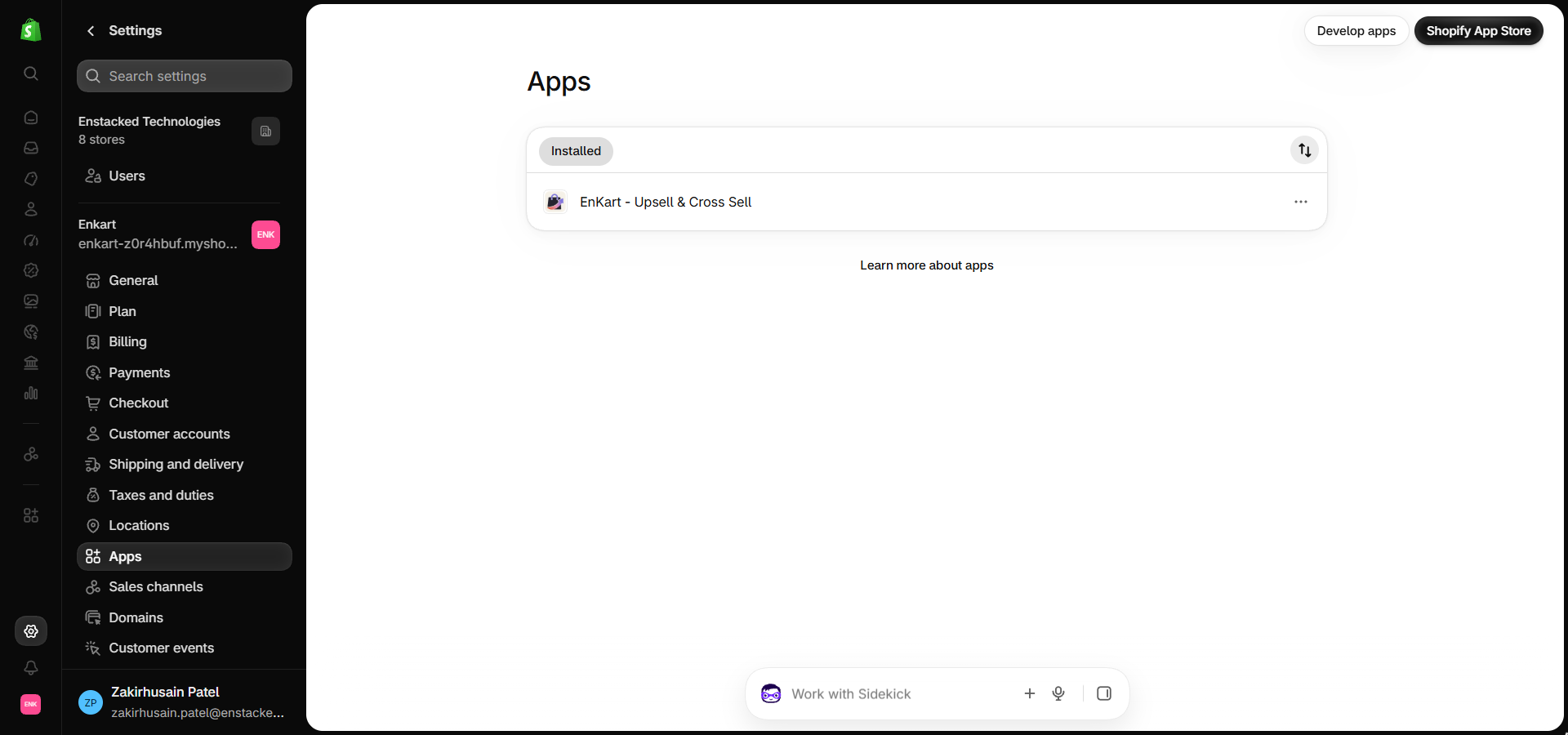
- Install EnKart from the Shopify App Store. Once it’s installed, you’ll see it under Settings → Apps, and EnKart shows up in your admin sidebar with Offers, Analytics and Targeting.
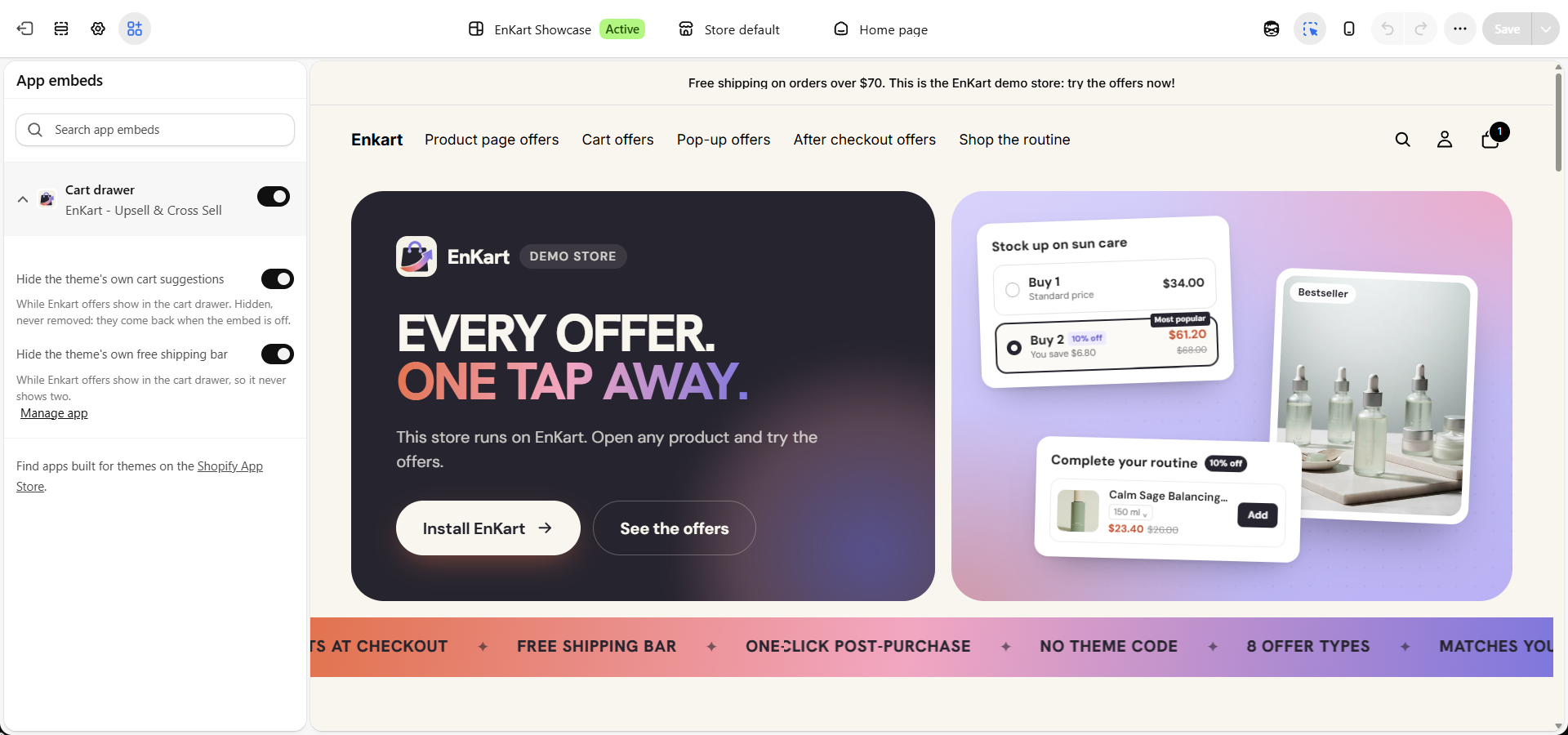
- Turn on the Cart drawer embed. In your theme editor, open App embeds and switch on Cart drawer. You can also hide your theme’s own cart suggestions and free shipping bar so shoppers never see them twice. They come back if you turn the embed off, so nothing is removed.
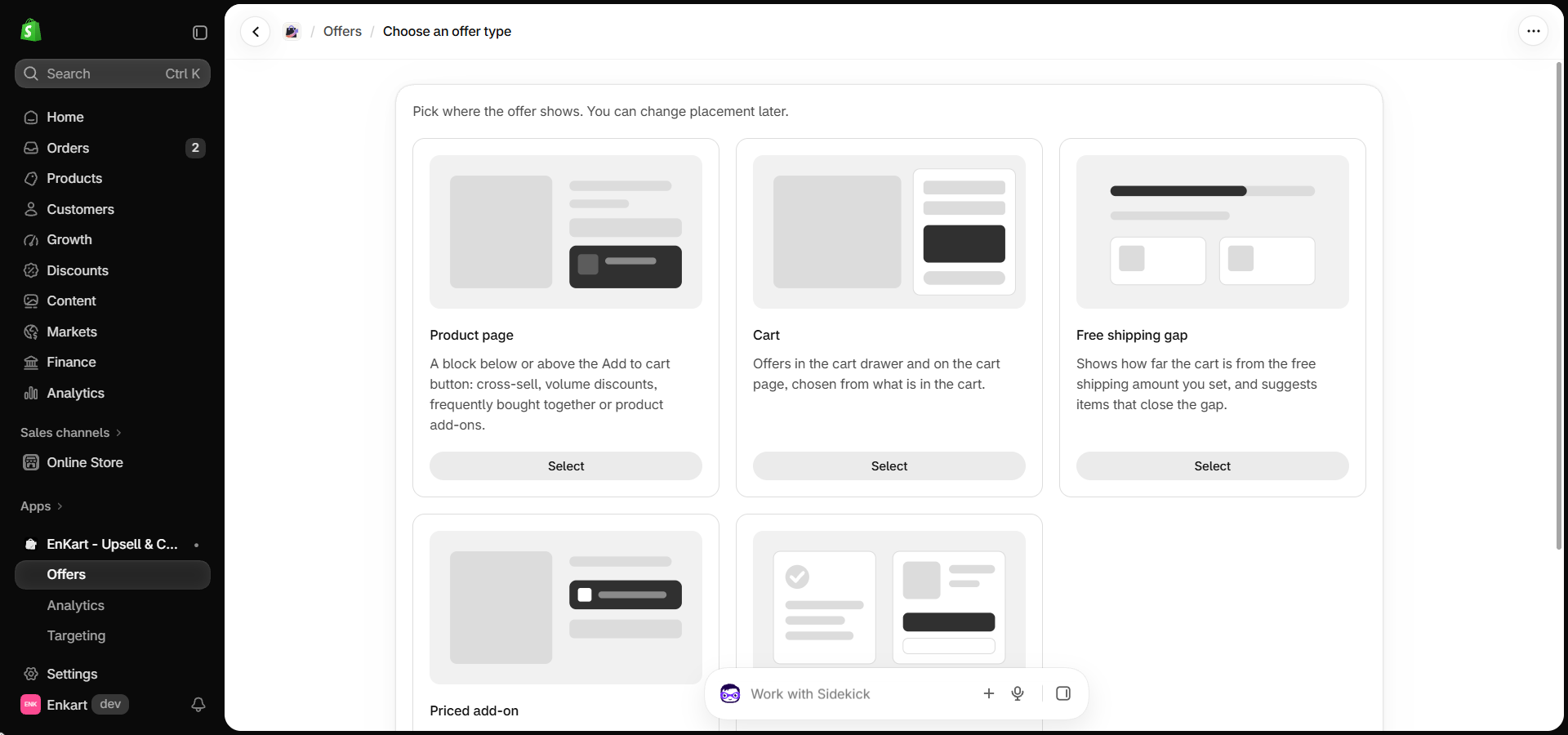
- Create your first offer. Go to Offers → Create offer and pick where it shows: Product page, Cart, Free shipping gap, Priced add-on or a post-purchase offer. You can change the placement later. Then choose your products, check the preview and publish..
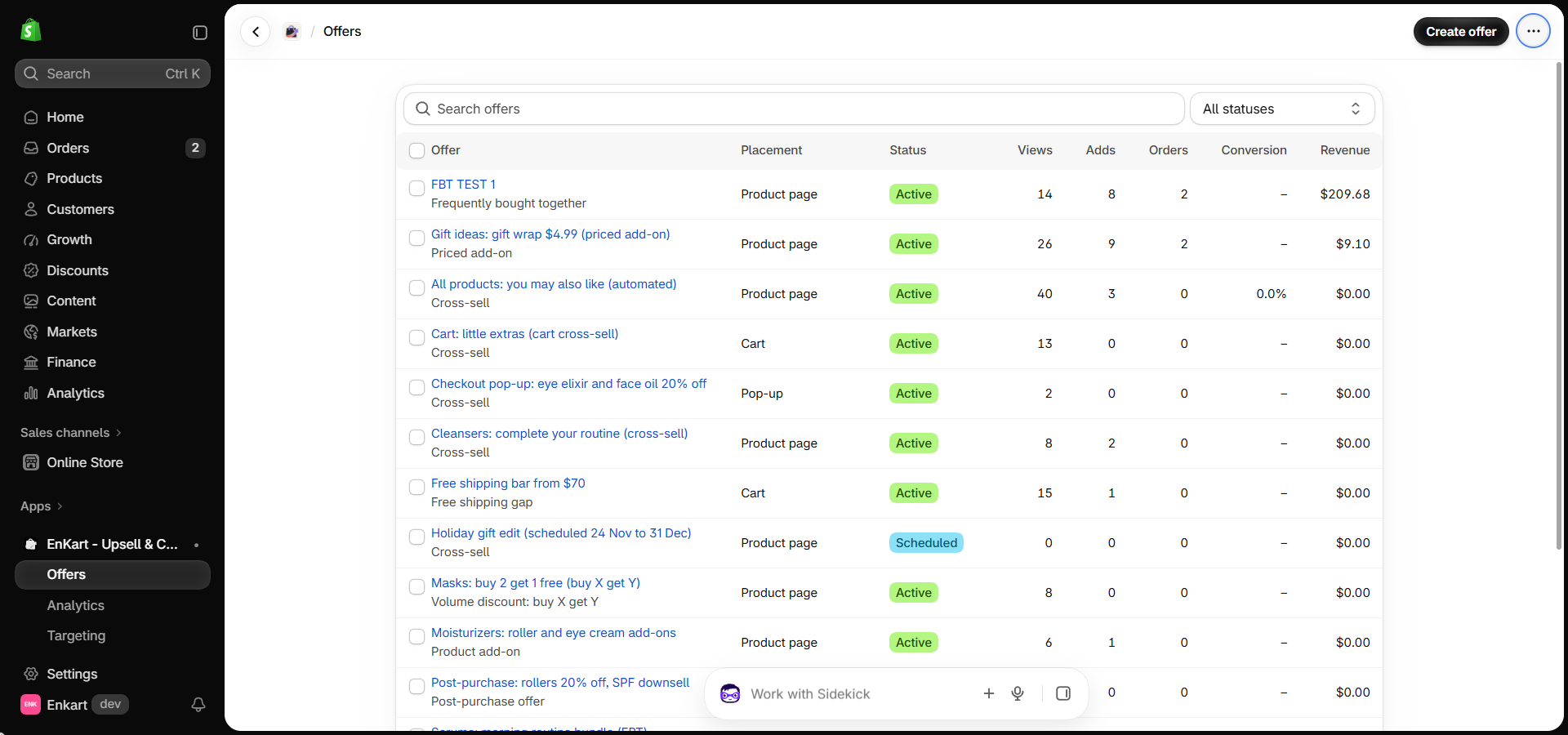
- Manage all your offers in one list. The Offers page shows every offer with its placement, status (Active or Scheduled), views, adds, orders, conversion and revenue. Use the search and status filter to find one fast.
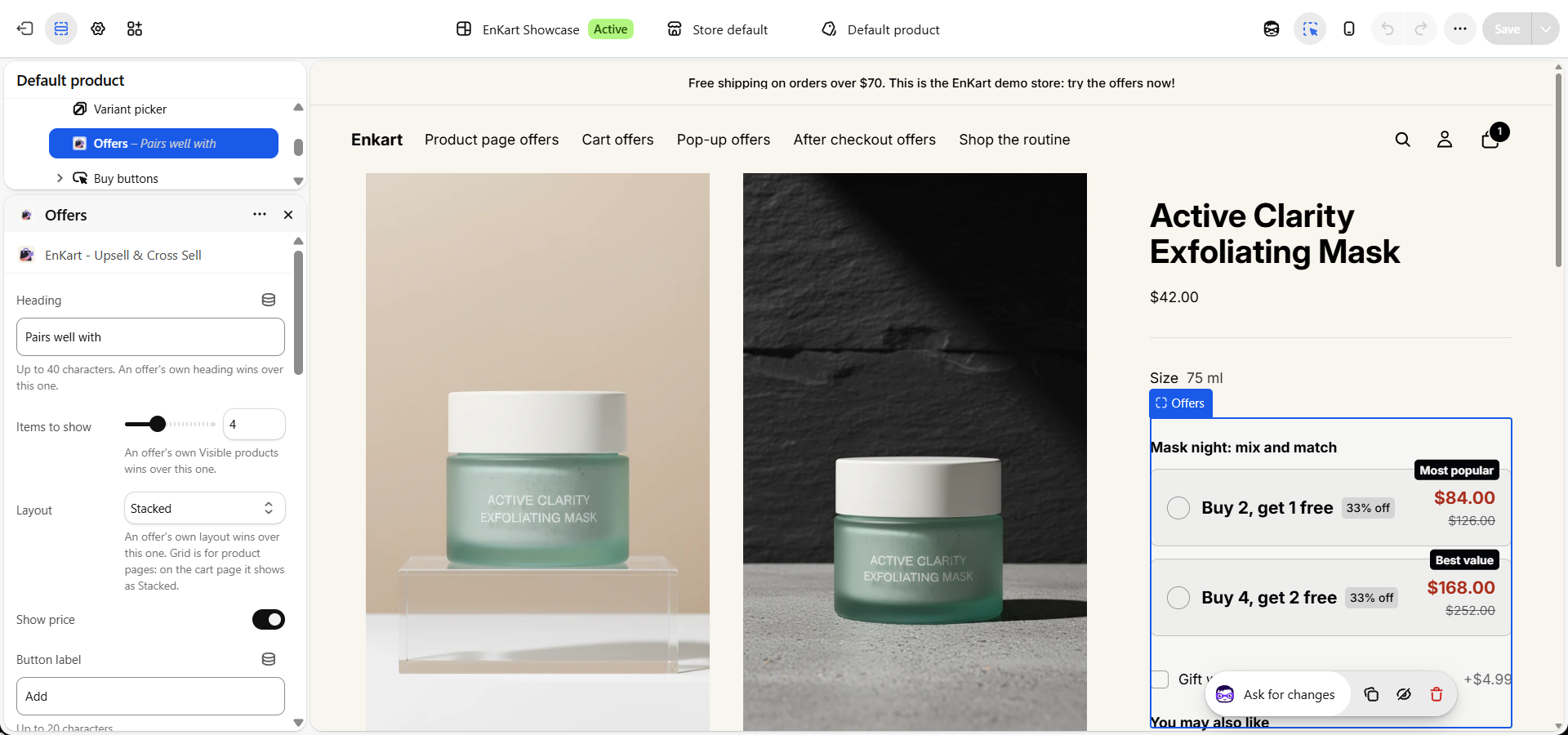
- Place the Offers block on your product page. In the theme editor, open your product template and add the EnKart Offers block above the Buy buttons. Set the heading, how many items to show, the layout and the button label, then press Save. Your offers, like buy 2 get 1 free, now show right where shoppers decide.
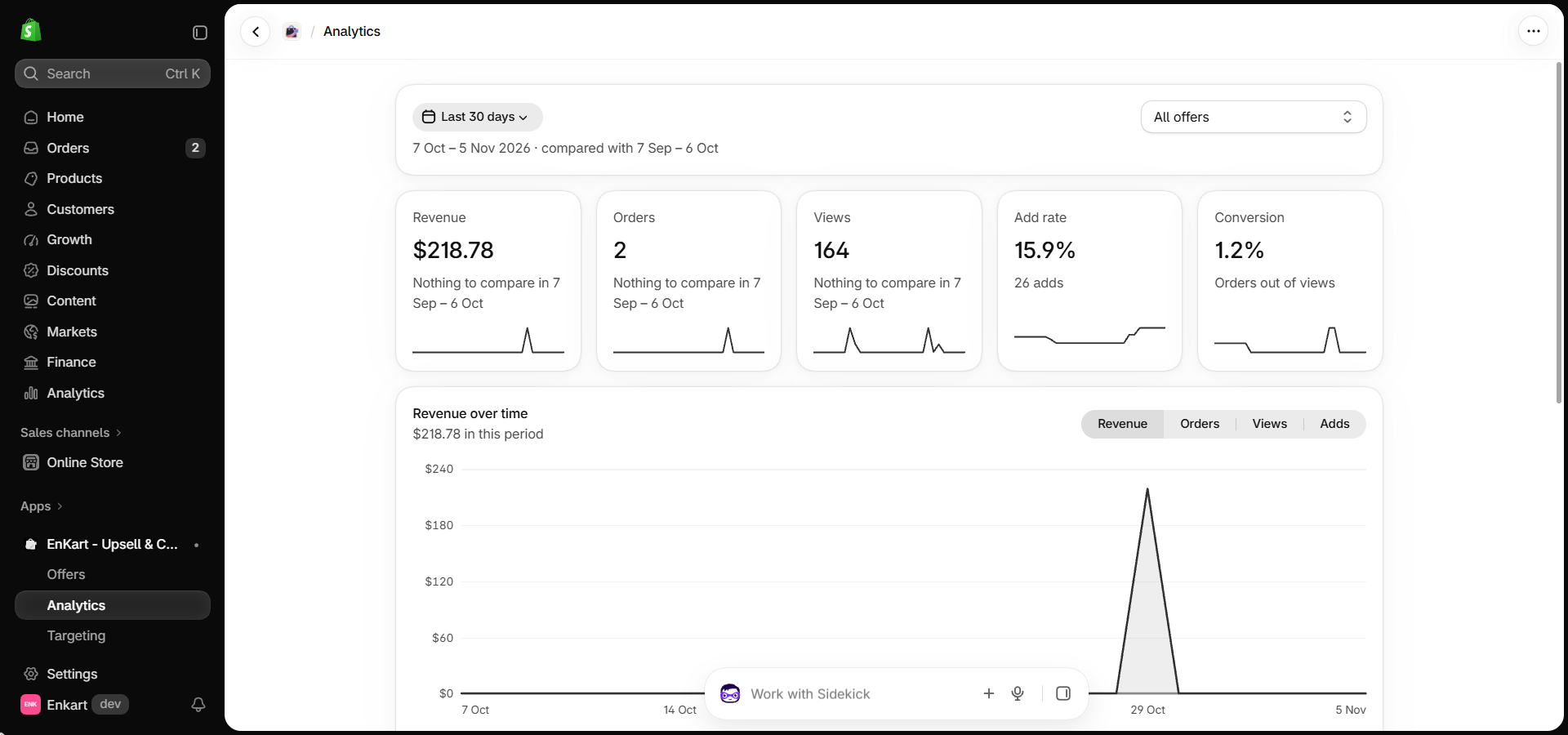
- Review results after two weeks. EnKart → Analytics shows revenue, orders, views, add rate and conversion for each offer.


Final Thoughts
Don’t launch eight offers before Black Friday. Launch one. Pick your best-selling product, add a single cross-sell or a free shipping bar, and let it run for two weeks. One clean offer will teach you more than five competing ones.
EnKart keeps that test low-risk, because a month with no offer sales costs you nothing. Install EnKart from the Shopify App Store and set up your first offer today.
And if your store needs more than a new Shopify upsell app, our Shopify app development team can help.
Frequently Asked Questions
What is the best upsell app for Shopify?
The best upsell app for Shopify depends on where you want offers to appear. For product page and cart offers with no fee in slow months, EnKart is a strong pick. For checkout upsells on Shopify Plus, go with a checkout specialist.
Is there a free upsell app for Shopify?
Yes. EnKart’s Free plan is a full upsell app for Shopify, with all eight offer types and up to $200 of offer revenue covered. It’s never billed.
Will a Shopify upsell app slow down my store?
Any Shopify upsell app adds some script to your pages. Shopify limits an app’s impact to 10 Lighthouse points, and EnKart keeps each script under 9.5 KB. Run PageSpeed Insights before and after you install any app.
Which upsell app should a small Shopify store start with?
Small stores searching for the Shopify best upsell app usually need low risk more than a long feature list. A free plan with every offer type, and no charge in slow months, is the safest place to start.
Can I run two upsell apps at the same time?
You can, but two apps can show competing offers and double your scripts. Pick one upsell Shopify app for each placement instead.

- Recover Lost Sales
- Boost Conversions
- Reduce Abandonment
- Faster Store
📘 FREE REPORT
The Shopify Revenue Leaks Report
Discover the hidden mistakes silently costing Shopify stores thousands every month—and learn exactly how to fix them.
Instant access • No spam • Unsubscribe anytime.