


How to Speed Up WordPress Sites: 11 Fixes That Actually Move the Needle
 Yash Barot

Summarize this blog post with:
TL;DR
The best way to speed up WordPress sites is to fix images, hosting, and caching first, since these three cause most of the slowdown on a typical site. Everything after that is refinement.
This guide covers 11 fixes across four areas, from the quick wins you can do today to the developer-level changes that squeeze out the last few hundred milliseconds.
Introduction
A slow WordPress site is not just annoying, it is expensive. Conversion rates drop by 4.42% for every additional second of load time between zero and five seconds, and most visitors never mention why they left, they just leave.
Go straight to what works. These 11 fixes are ordered by impact, so start at the top and work down.
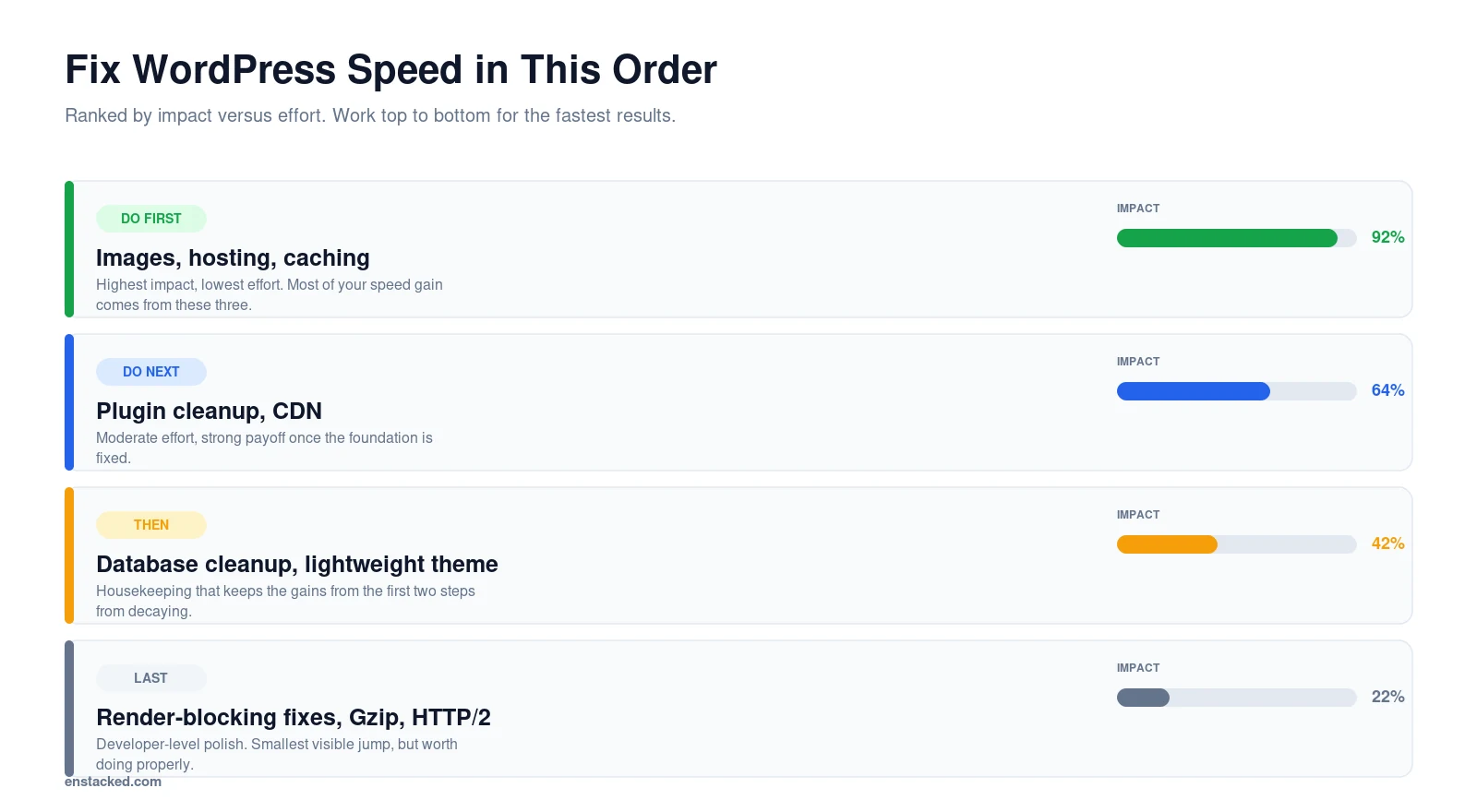
How to Improve WordPress Website Speed: Fix These First
These three changes account for most of the speed gain most sites will ever see. Do them before anything else on this page.
1. Optimize Images for WordPress
Compress every image before uploading it. Tools like TinyPNG or plugins like Smush and ShortPixel handle this automatically if you would rather not do it by hand.
Serve WebP instead of JPEG or PNG wherever your theme supports it, and lazy load every image that sits below the first screen using loading=”lazy”.
Your choice of theme is very important. The theme is the skeleton of your site and you need to pick a lightweight one. Image optimization can significantly improve your speed too: resize to at most two times display size, compress with lossy compression, then convert to WebP.
2. Choose High-Performance Hosting
If you are on shared hosting, switching is usually the single highest-leverage change available. Managed WordPress hosts like WP Engine, Kinsta, or SiteGround include SSD storage, scalable resources, and built-in caching by default.
Also read: WordPress.org Banned WP Engine: What’s the Ultimate Drama
3. Audit and Reduce Plugins
Remove anything you are not actively using, then check for replacements that do the same job with less overhead. One well-built plugin doing three jobs beats three plugins doing one each.
Also read: 10 Best IDX Plugins for WordPress
How to Increase WordPress Website Speed With Plugins
Once the foundation is fixed, the right plugins handle the rest of the work automatically instead of needing manual upkeep every week.
4. Install a Caching Plugin
WP Rocket, W3 Total Cache, and LiteSpeed Cache are the three worth considering. LiteSpeed gives you the most control, WP Rocket sits in the middle, and W3 Total Cache is the most configurable if you know what you are doing.
Whichever you pick, enable both browser caching and server-side caching so repeat visits load close to instantly.
5. Add a Content Delivery Network
Cloudflare, BunnyCDN, and StackPath all serve your content from servers close to each visitor instead of one single location, which cuts latency for anyone far from your host.
6. Use an Image Optimization Plugin
If you already have a large media library, Imagify or ShortPixel will retroactively compress and convert everything you have already uploaded, not just new uploads.
How to Increase WordPress Website Speed Without a Plugin
Some of the biggest gains happen at the code and database level, and none of them require installing another plugin.
7. Reduce Render-Blocking Resources
For developers: combine and minify CSS and JavaScript, load critical CSS inline for above-the-fold content, and defer non-essential JavaScript so it does not block the initial render.
8. Run WordPress Database Optimization
Clean out post revisions, spam comments, and expired transients on a schedule. WP-Optimize or Advanced Database Cleaner automate this if you would rather not run the queries manually.
9. Switch to a Lightweight Theme
GeneratePress, Astra, and Neve are built for performance from the ground up. If your PageSpeed report keeps pointing back at theme weight, replacing it beats working around it for another year.
How to Improve Page Speed in WordPress: Advanced Techniques
For developers comfortable with server-level configuration, these squeeze out the last portion of load time once the basics above are handled.
10. Enable Gzip Compression and HTTP/2
Gzip compression shrinks file sizes before they are sent to the browser, and HTTP/2 lets multiple resources transfer over one connection instead of queuing one at a time.
11. Set Up DNS Prefetching and Lazy Loading for Embeds
DNS prefetching resolves domain names before they are needed, which shaves time off any third-party resource. Lazy load videos and embedded content the same way you lazy load images.
What Results to Expect, and When
Image compression and a caching plugin usually show up in your PageSpeed score within a day, since both take effect the moment they are configured.
A hosting migration takes longer to show its full effect, usually a week or two, since DNS propagation and server-side caching both need time to settle.
Code-level changes move the score last but by the smallest visible amount, since most of the damage is already fixed by the time you reach them. Do not skip them, but do not expect the same jump you saw from images and hosting.
When to Bring in WordPress Speed Experts
Some slowdowns come from complex setups, incompatible plugins, or server limitations that are hard to diagnose without developer tools.
If your site is still slow after working through this list, or you would rather serve customers than debug render-blocking scripts, it is worth bringing in help.
Enstacked has handled WordPress speed optimization for 7 or more years, and our dedicated WordPress developers work on both quick fixes and full technical overhauls depending on what your site actually needs.
Don’t let a slow website hold you back.
Frequently Asked Questions
How can I make my WordPress website faster?
Start with the three highest-impact fixes: compress and convert your images to WebP, move to managed hosting if you are on shared hosting, and install a caching plugin like WP Rocket or LiteSpeed Cache.
These three account for most of the improvement most sites will ever see.
How can I optimize my WordPress website speed?
Optimize images first, then add caching and a CDN, then clean up your database and audit your plugins. Run Google PageSpeed Insights before and after each change so you can see which fixes actually moved the needle on your specific site.
How do I fix a slow WordPress website?
Work through the fixes in order of impact: compress images, switch to managed hosting, and reduce plugins first, then add caching and a CDN, then clean up the database and theme, then handle code-level fixes last.
How do I increase my website speed without hiring anyone?
Most of the fixes above do not require a developer. Compressing images, switching hosting, installing a caching plugin, and adding a CDN are all things a site owner can do directly.
Code-level changes like reducing render-blocking resources are the ones worth handing to a developer.

- Recover Lost Sales
- Boost Conversions
- Reduce Abandonment
- Faster Store
📘 FREE REPORT
The Shopify Revenue Leaks Report
Discover the hidden mistakes silently costing Shopify stores thousands every month—and learn exactly how to fix them.
Instant access • No spam • Unsubscribe anytime.