







Introduction
WordPress 6.9 has officially arrived, and it’s already becoming one of the most talked-about WordPress releases of the year.
Packed with performance improvements, new design capabilities, and smarter workflows for site builders, this update is shaping the future of how creators, businesses, and developers manage content online.
If you’re trying to understand what’s new, WordPress 6.9 news today, and whether you should hit that update button today, here’s the simple breakdown.
What is the WordPress 6.9 Release Offer?
1: A Cleaner, Faster Editor
The editor in WordPress 6.9 gets a noticeable redesign:
- The interface is lighter and responds faster
- Template and template-part navigation is smoother
- Block tools are grouped more clearly
- Global Styles are easier to discover
This means less clicking around and more time actually creating, making it one of the best WordPress new version features.
2: New Blocks for Modern Pages
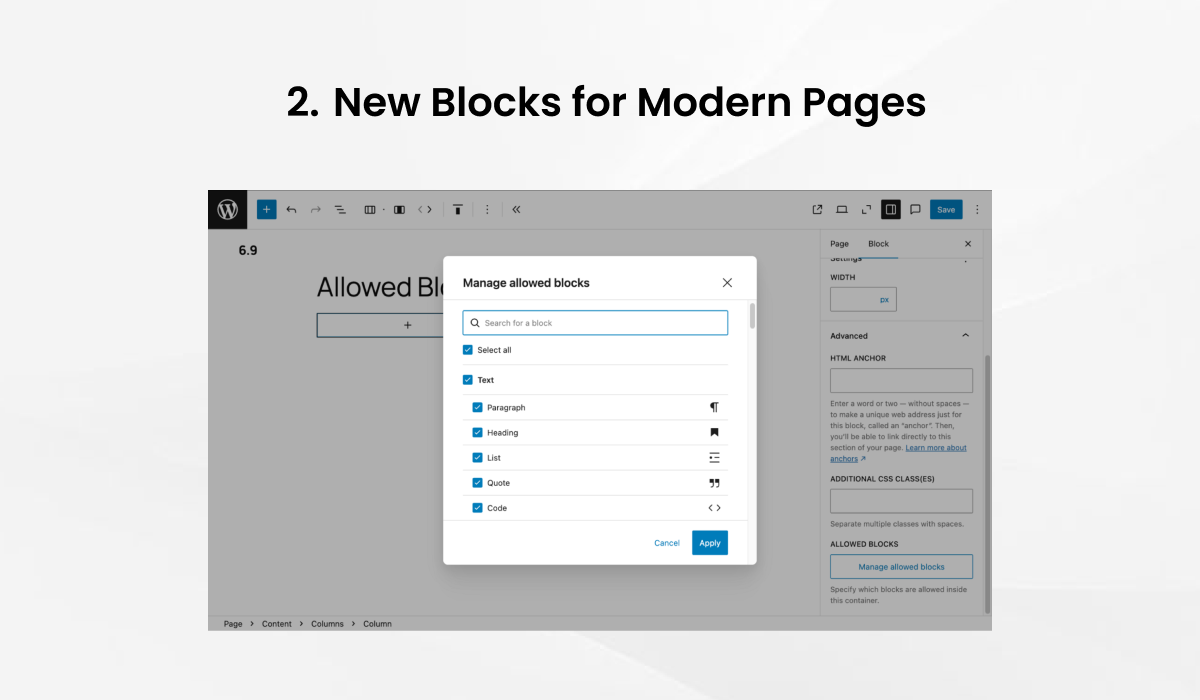
WordPress 6.9 adds several powerful built-in blocks so you don’t have to rely on external plugins.
- Accordion Block: Perfect for FAQs, collapsible sections, and cleaner long-form pages.
- Time-to-Read Block: Automatically displays estimated reading time using content length + word count analysis.
- Math Block: Supports mathematical expressions and formulas using LaTeX-style syntax. Great for education, documentation, engineering blogs, or academic content.
- Terms Query Block: Let’s you display posts filtered by taxonomy terms. Useful for listing blog categories, service categories, regions, products, and more.
These built-in blocks reduce dependency on third-party plugins, lowering load times and increasing stability, a big step forward in the WordPress latest version features lineup.
3: Global Styles That Actually Feel Useful
In the WordPress 6.9 release, Global Styles have become much more practical:
- Switch between design presets instantly
- Update fonts, spacing, and color palettes site-wide
- Apply style families created by theme authors
- Maintain consistent brand identity without touching code
For creators and agencies, this is a huge quality-of-life upgrade.
4. WordPress 6.9 Performance Improvements (Real Speed Gains)
This update includes several under-the-hood speed improvements that make sites load faster:
- On-demand block CSS loading: only styles for used blocks are loaded
- Improved script loading for lighter JavaScript execution
- Optimized block rendering reduces server processing time
- Reduced layout shifts (CLS improvements) for a smoother page experience
These optimizations directly help SEO, Core Web Vitals, and user experience, making them standout WordPress 6.9 features for performance-focused sites.
Also read: How to Improve WordPress Website Speed?
5: Built-In Collaboration Tools
For the first time, WordPress introduces true in-editor collaboration:
- Leave comments, notes, and suggestions directly on individual blocks
- Use threaded conversations inside the editor
- Streamline approvals across teams, designers, writers, and clients
No more screenshots or email chains. This is one of the biggest new WordPress version features for agencies and content teams.
6: Developer Improvements Under the Hood

WordPress 6.9 ships several technical enhancements that make development more flexible, modern, and powerful.
Interactivity API Enhancements
Developers can now build reactive, dynamic front-end interactions directly within blocks without relying on heavy JavaScript frameworks. Great for: sliders, counters, tabs, dynamic UI elements.
Expanded Block Bindings
Blocks can bind to custom data sources (meta fields, options, APIs) more reliably, enabling more dynamic content use-cases.
Updated Abilities API
This helps developers control what users can see or edit inside the editor more granularly.
Improved DataViews
Enables more efficient querying, sorting, and filtering, especially useful for complex dashboard or admin customizations.
PHP 8.5 Compatibility
Future-proofs WordPress and ensures cleaner, faster processing under modern PHP versions.
REST API Consistency Updates
More predictable responses and improved validation make third-party integrations smoother.
These upgrades quietly strengthen the developer experience and make WordPress 6.9 much more ready for enterprise use.
Here’s What Some of the Users are Saying About WordPress 6.9 Review on Reddit:

The WordPress 6.9 review from Reddit sources says that it is offers notes in the editor, smooth drag and drop, new creative blocks, and faster WordPress 6.9 performance across your site.
The abilities API looks exciting to me as well, as it brings peace in an AI-obsessed era. Now I can perform actions across PHP, REST, JS, and even bot agents.
Several users reported no issues after updating, even across dozens of sites, implying stability under many setups: I have no issues whatsoever. Loving some of the content features.
Since the WP 6.9 release yesterday (Dec 2nd), I’ve had multiple cases of sites suddenly hitting 100% CPU usage continuously. Rolling back to the previous version immediately fixes the load.
Things to Consider Before Updating WordPress 6.9 Update?
The WordPress 6.9 release is safe for most websites, but there are a few smart considerations before hitting the Update button.
1. Your Site’s Complexity Matters
Simple sites (blogs, portfolios, landing pages) can be updated immediately. But if your site includes:
- WooCommerce
- Membership systems
- LMS functionalities
- Multi-language setups
- Custom-coded templates
Then testing is essential. These websites rely on plugins that may need time to support WordPress’ latest version features.
2. Plugin & Theme Compatibility
If a core plugin (SEO, security, builder, eCommerce, booking system) has not confirmed compatibility with WordPress 6.9, wait a few days.
Compatibility issues can cause:
- Broken layouts
- PHP errors
- Missing content blocks
- Checkout failures
Always update supporting tools before WordPress itself.
3. Custom Code, Hooks & Functions
If your developer has added:
- Custom functions.php code
- Hooks & filters
- Template overrides
- Block customizations
- API integrations
Then test these changes, because the new WordPress 6.9 features may modify block rendering and data handling.
4. High-Traffic or Revenue-Generating Sites
If your website receives constant traffic or handles live revenue:
- Update during low-traffic hours
- Monitor WordPress 6.9 performance after updating.
- Run a quick Lighthouse/Core Web Vitals test
WordPress’ latest version features improved performance, but it’s still smart to schedule updates strategically.
5. No Immediate Need? You Can Wait
If your site is stable and doesn’t require the new features today, waiting a week lets developers release quick patches or compatibility updates.
This is optional, but it’s a safe best practice.
How to Upgrade to the Latest WordPress 6.9 Release?
The WordPress 6.9 release brings major improvements in design, speed, and editing, but upgrading the right way is just as important as the features themselves.
Below is a detailed, beginner-friendly checklist to help you upgrade safely while getting the most out of the latest WordPress features.
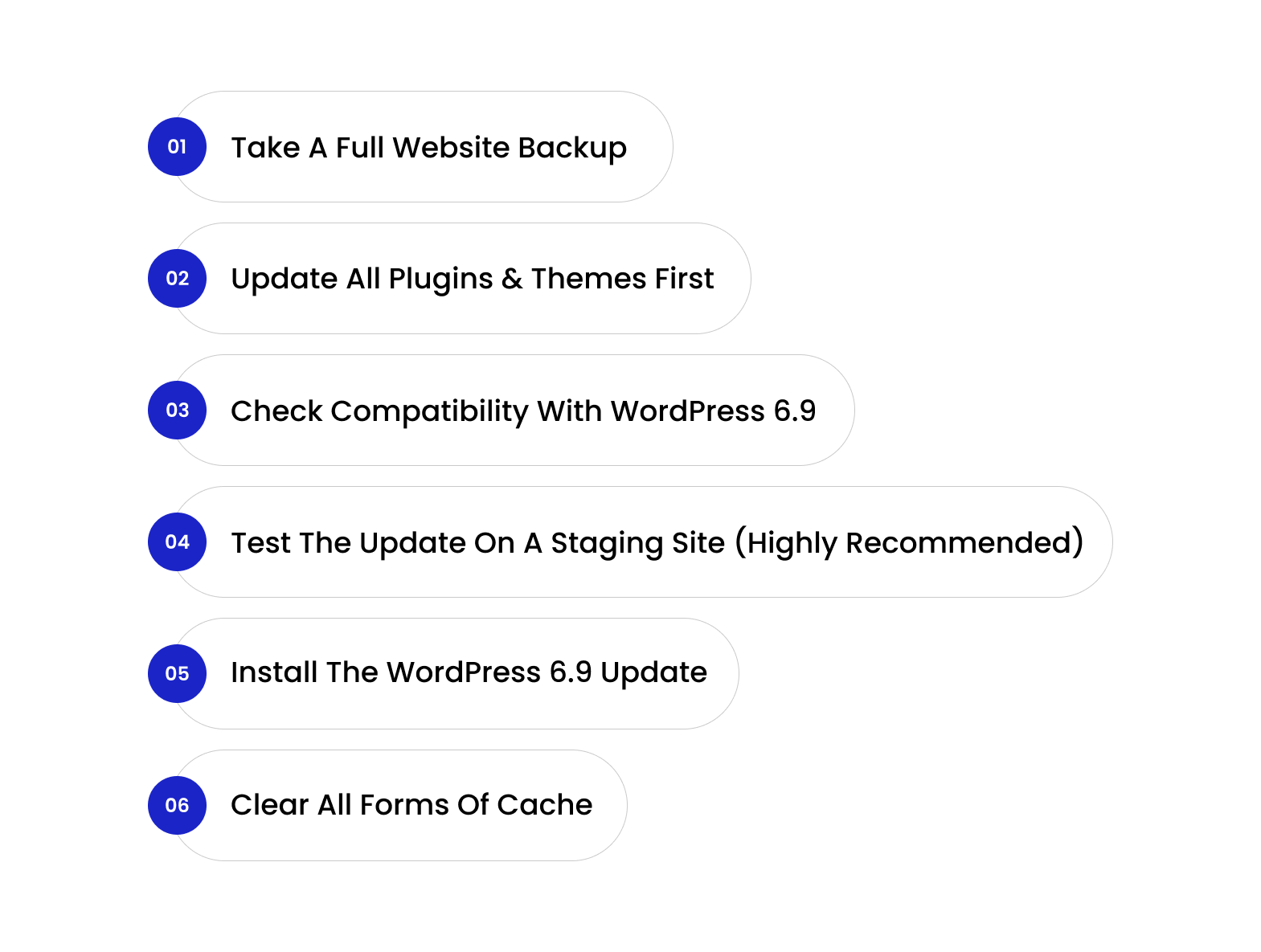
1. Take a Full Website Backup
Before installing any core update, always back up your entire website.
This includes:
- Database (posts, pages, users, settings)
- Theme & child theme files
- Plugins
- Uploads/media
If something breaks after updating to WordPress 6.9, you can restore everything in one click.
Tools you can use:
- UpdraftPlus
- Jetpack Backup
- BlogVault
- Hosting panel backups
A backup is non-negotiable.
If you need assistance with the update, connect with us to hire a dedicated WordPress developer starting at $9/ hour to help you out.
2. Update All Plugins & Themes First
Most update issues come from outdated add-ons, not WordPress itself.
Before installing the WordPress 6.9 release, update your:
- WordPress Theme (especially if you use a block theme)
- Best WordPress page builders like Elementor, Divi, Spectra, Bricks, etc.
- Essential plugins
- WooCommerce (if you run a shop)
- Security plugin
- Cache plugin
Updated plugins ensure smooth compatibility with WordPress’s new version features.
3. Check Compatibility With WordPress 6.9
Many developers announce compatibility updates as soon as a new WordPress version is released.
You should check:
- Theme developer notes
- Plugin changelogs
- Hosting provider announcements
- GitHub repositories (for custom tools)
If your critical plugins mention support for WordPress 6.9 features, you’re safe to proceed.
4. Test the Update on a Staging Site (Highly Recommended)
If your site is complex or depends on transactions, bookings, or user accounts, testing the WordPress 6.9 update on staging is essential.
Staging helps you check:
- Whether templates break
- Whether plugins conflict
- Whether custom code behaves correctly
- How fast the site runs under the WordPress latest version features
Most managed hosts provide one-click staging environments.
5. Install the WordPress 6.9 Update
Once everything is ready, go to Dashboard → Updates → Update to WordPress 6.9
The update typically takes less than a minute.
After the WordPress 6.9 release is installed:
- Open your site
- Test important pages
- Check forms, checkout, search, and navigation
This ensures everything works under the new version.
6. Clear All Forms of Cache
Caching can cause older styles or scripts to load even after updating.
Clear:
- Browser cache
- WordPress caching plugin cache
- CDN cache (Cloudflare, Bunny, Fastly, etc.)
- Server-level cache (LiteSpeed, Nginx, Redis)
Clearing the cache ensures you fully experience the WordPress new version features without glitches.
WordPress 6.9 Review From the Enstacked wordpress developer:
WordPress 6.9 is a refinement-driven update focused on speed, usability, and smoother workflows rather than big visual changes. Early WordPress 6.9 reviews highlight noticeable performance gains and a cleaner editing experience by Yash Barot
Key Highlights
- WordPress 6.9 performance improvements include on-demand block CSS loading, optimized scripts, and reduced layout shifts, helping Core Web Vitals and SEO.
- The editor feels lighter and faster, with improved template navigation and easier access to Global Styles.
- New core blocks like Accordion, Time-to-Read, Math, and Terms Query reduce plugin dependency.
- Built-in collaboration tools enable block-level comments and smoother team reviews.
- Elementor WordPress 6.9 compatibility is generally stable when plugins are up to date.
Final Verdict
This WordPress 6.9 review confirms it’s a solid upgrade for performance-focused sites and content teams. Simple sites can update safely, while complex setups should test on staging first. Overall, WordPress 6.9 is a smart, stability-first release with real-world speed benefits.
To Wrap!
WordPress 6.9 feels like one of those updates that quietly changes how you work. The editor is cleaner, the workflow feels lighter, and WordPress 6.9 features unlock small but meaningful upgrades that stack up over time.
If you care about speed, flexibility, and a better creation experience, the WordPress new version features in this release are worth exploring. The platform keeps moving closer to a modern, design-first tool, and WordPress 6.9 is a solid step in that direction.
And if you’re thinking about leveling up your site, planning a redesign, or upgrading safely without breaking anything, the team at Enstacked is always here to help.
Want to know more about Enstacked or hire dedicated WordPress developers? Book a free consultation call now.
Frequently Asked Questions(FAQs)
Yes, WordPress 6.9 is stable, but the best experience comes if your plugins and theme already support the latest WordPress version features.
No, classic themes work fine, but block themes give you the full benefit of the new editor upgrades and WordPress’s new version features.
WordPress 6.9 performance is noticeably better due to on-demand block CSS loading, optimized script handling, and reduced layout shifts. Many sites report faster load times and improved Core Web Vitals after updating.
Key WordPress 6.9 performance improvements include lighter CSS output, more efficient block rendering, improved JavaScript execution, and better CLS handling, all of which directly support SEO and user experience.
Yes. If you took a backup, you can restore your previous version with one click using your backup tool or hosting panel.
You don’t have to, but upgrading to a newer PHP version unlocks better wordpress 6.9 performance and enables advanced features.
Most major builders update quickly to support the latest WordPress version features, but it’s best to check compatibility before updating.
Indirectly, yes, faster rendering, reduced layout shifts, and lighter CSS all help improve SEO performance signals.
Not really. The interface feels more intuitive, so using the WordPress 6.9 features actually becomes easier, not harder.
WordPress 6.9 news today focuses on new core blocks, in-editor collaboration, stronger Global Styles, developer-friendly APIs, and early reports of real-world speed improvements.

