
Gearing Up!
For years, businesses have talked about AI as a productivity booster. Smarter insights. Faster decisions. Better customer experiences. However, in reality, most AI within enterprise systems has remained passive. It waits for prompts. It suggests actions. It generates summaries. Then it stops.
Salesforce Agentforce changes that dynamic.
Instead of AI sitting on the sidelines, Agentforce introduces AI agents that actively work inside your Salesforce ecosystem. These agents do not just analyze data. They reason, take action, trigger workflows, and operate across sales, service, marketing, and operations with real context.
AI adoption has surged by 282% in the past year, showing that businesses are shifting from experimentation to scaling AI across operations, a trend that sets the stage for tools like Salesforce Agentforce.
As adoption grows, companies are wondering what Salesforce Agentforce is, why they are loving it, how to deploy it safely, and more. Then, this blog is all you need.
What Is Salesforce Agentforce?
Salesforce Agentforce is Salesforce’s approach to embedding AI agents directly into everyday business operations. At its core, Agentforce lets companies build intelligent AI agents that understand Salesforce data and take action automatically. Instead of AI only recommending next steps, Agentforce enables Salesforce to execute work inside the system.
What makes Salesforce Agentforce different
- Action-driven AI
Agentforce agents do more than analyze. They qualify leads, update records, trigger workflows, and follow up based on defined business logic. - Built on real CRM data
Agents work with live Salesforce data, including leads, accounts, opportunities, cases, and activities. This ensures decisions are contextual and accurate. - Aligned with your business rules
Every agent follows your processes, permissions, and governance models. Actions remain controlled, predictable, and auditable. - Native to the Salesforce ecosystem
The Salesforce Agentforce platform operates inside Salesforce. It is not an external chatbot or disconnected AI tool. It works directly within Sales Cloud, Service Cloud, Marketing Cloud, and existing workflows.
Also Read:
Agentforce reduces manual handoffs, eliminates repetitive tasks, and keeps work moving without constant human intervention. Teams stay focused on strategy, relationships, and revenue while AI handles routine execution.
Salesforce reported that Agentforce interactions have surpassed trillions of tokens processed, demonstrating heavy usage and engagement within customer systems powered by the Salesforce data layer.
Salesforce Agentforce Use Cases and Why Companies Are Loving It
Companies are not adopting Salesforce Agentforce because it sounds innovative. They are adopting it because it solves very real operational problems. The value of Salesforce Agentforce AI shows up clearly when you look at how teams actually use it across sales, service, and operations.
Below are the most common Salesforce Agentforce use cases driving adoption in enterprise and mid-scale businesses.
1: Sales Lead Qualification and Routing
One of the strongest Agentforce Salesforce use cases is lead management.
With the Salesforce Agentforce platform, AI agents automatically review incoming leads using CRM data such as company size, industry, intent signals, and engagement history. Based on predefined rules, the agent qualifies the lead, assigns it to the right sales rep, updates the pipeline, and triggers a follow-up.
Why companies love it:
Sales teams respond faster, high-quality leads never sit idle, and reps spend more time selling instead of sorting data.
2: Customer Support Case Handling
Support teams deal with high case volumes, repetitive issues, and constant prioritization challenges. Using Salesforce Agentforce AI, agents can analyze incoming cases, categorize them, set priority levels, suggest or execute resolutions, and escalate only when human intervention is required.
Why companies love it:
Faster resolution times, reduced support workload, and more consistent customer experiences without adding headcount.
3. Revenue and Pipeline Management
Salesforce already tracks revenue, but what Salesforce Agentforce is doing differently here is execution.
Agentforce agents monitor pipeline changes, stalled deals, and risk signals. They can notify stakeholders, update opportunity stages, request follow-ups, or trigger workflows automatically.
Why companies love it:
Leaders get proactive pipeline movement instead of reactive reporting. Revenue operations become more predictable.
4: Marketing Follow-Ups and Engagement
Marketing teams often lose momentum between campaigns and sales handoffs.
With what is Agentforce Salesforce, AI agents can act on engagement data, trigger personalized follow-ups, update lead status, and coordinate with sales teams directly inside Salesforce.
Why companies love it:
Better alignment between marketing and sales, fewer missed opportunities, and stronger campaign ROI.
5: Internal Operations and Workflow Automation
Beyond customer-facing teams, the Salesforce Agentforce platform supports internal operations. Agents can handle approvals, task assignments, reminders, data validation, and cross-team coordination based on business rules.
Why companies love it:
Operations run smoothly in the background while teams focus on decision-making instead of process management.
Fisher & Paykel, a global premium home appliance brand, adopted the Salesforce Agentforce platform to improve customer support efficiency across regions, where high inquiry volumes and repetitive service requests were slowing response times.
By deploying Salesforce Agentforce AI agents, the company automated routine inquiries, service bookings, and case handling. As a result, Fisher & Paykel reduced average call handling times by nearly 50 percent, allowing human agents to focus on complex issues.
How to Get Started With Salesforce Agentforce
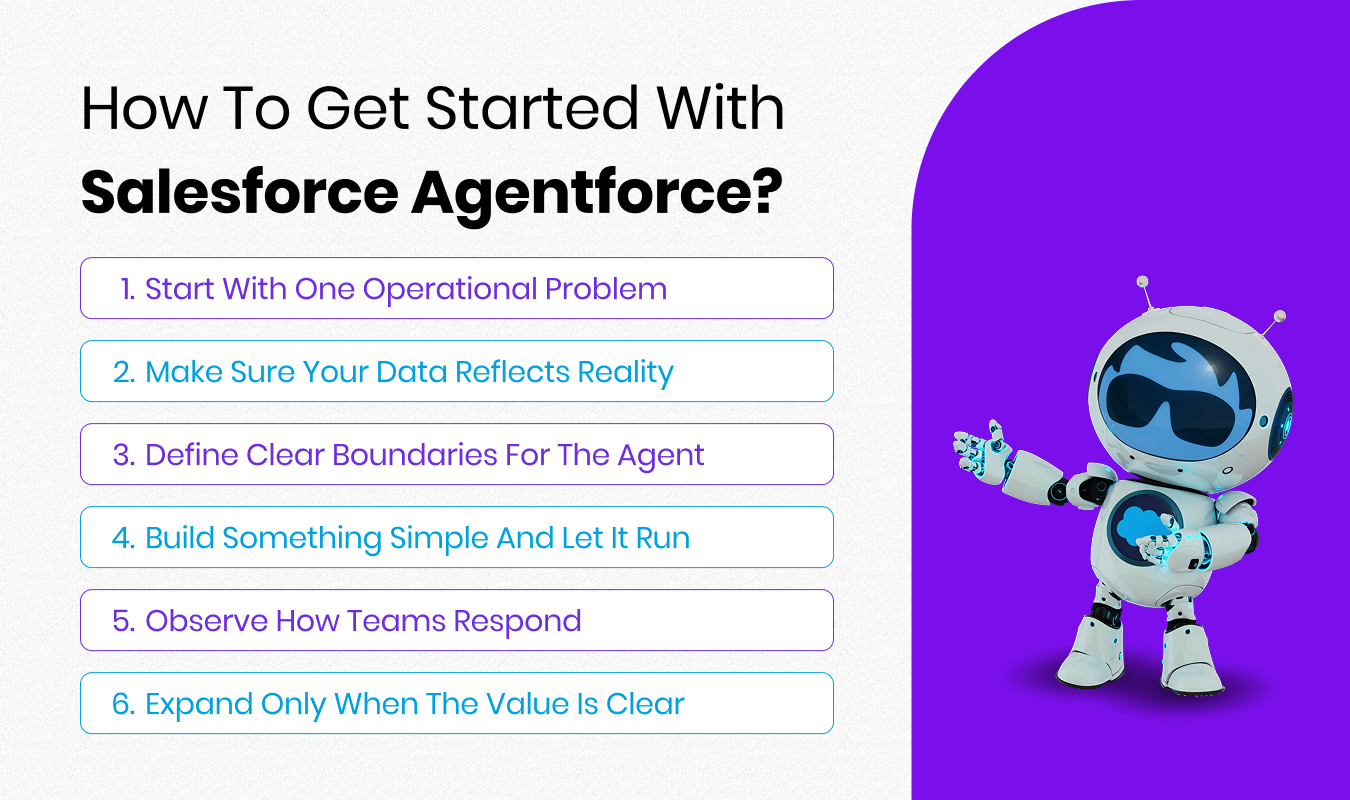
The smartest way to get started with Salesforce Agentforce is not by thinking about AI. It is by looking at the parts of your Salesforce setup where work slows down, handoffs happen too often, or teams rely heavily on reminders and manual follow-ups.
That is where Agentforce fits naturally.
1. Start with one operational problem
Before enabling anything, identify a single process that already exists in Salesforce but depends too much on human effort.
This might be lead qualification, case prioritization, follow-ups, or internal task coordination. Strong Salesforce Agentforce use cases usually involve work that is repetitive, rules-based, and time-sensitive.
Starting with one problem keeps the rollout grounded and avoids overengineering.
Enstacked expert tip: Start with a process that your team already complains about. If users feel the pain daily, Agentforce adoption happens naturally.
2. Make sure your data reflects reality
Agentforce works with the data you already trust in Salesforce. If that data is unclear or inconsistent, the agent will behave the same way.
Before moving forward, review how leads, accounts, cases, or opportunities are structured. Ownership rules, statuses, and required fields should match how teams actually work, not how the system was originally set up.
Enstacked expert tip: Fix process clarity before fixing data. Clean data follows clear ownership and decision rules, not the other way around.
3. Define clear boundaries for the agent
A good Agentforce setup is not about giving AI unlimited freedom. It is about giving it a clear responsibility. Decide what the agent is allowed to do on its own, where it should pause, and when a human needs to step in. This keeps actions predictable and builds trust across teams.
This is also why many organizations involve a Salesforce-certified Agentforce specialist early. The goal is not speed. It is control.
Enstacked expert tip: Limit the agent’s authority early. Expanding scope later is far easier than rebuilding trust after a bad automation experience.
4. Build something simple and let it run
Your first Agentforce agent should feel almost bored. Let it handle one job. Let it follow clear rules. Let it work quietly in the background. Once it proves reliable, teams naturally start asking where else it can help.
If the first agent feels boring, you are doing it right. Reliable execution beats impressive demos.
5. Observe how teams respond
One overlooked part of Agentforce adoption is how people react to it. Pay attention to whether teams trust the agent’s actions, rely on it, or work around it. Feedback at this stage is more valuable than dashboards. Adjustments here make the difference between short-term experimentation and long-term adoption.
Enstacked expert tip: User behavior tells you more than dashboards. If people stop checking behind the agent, it is working.
6. Expand only when the value is clear
Once the first use case is working, scaling becomes easier. New agents can support sales, service, marketing, or internal operations using the same principles. At this point, Agentforce Salesforce stops feeling like a feature and starts feeling like part of how work gets done.
Hire Salesforce Developers from Enstacked for Salesforce Agentforce Consulting to Implementation.
If you plan to implement Salesforce Agentforce in your workflow and want to do it right from the start, having the right Salesforce expertise is crucial.
And, if you are looking for one, you can hire dedicated Salesforce developers from Enstacked starting at only $23 per hour.
At Enstacked, we work with enterprise and mid-scale teams who want Agentforce to actually fit into how Salesforce already runs in their organization. We help you move from early exploration to a stable, production-ready setup, covering everything from use-case discovery and Agentforce configuration to Salesforce integration and ongoing optimization.
Not sure where to start?
Book a free consultation to discuss your Agentforce goals, or get started with a 7-day free Agentforce implementation to see how it works inside your Salesforce environment before committing.
Frequently Asked Questions(FAQs)
Most businesses begin with Salesforce Agentforce use cases that already exist in their CRM, such as lead routing, case triage, or follow-ups, where manual effort slows teams down.
No. Salesforce Agentforce AI is designed to support teams by handling routine execution, while humans focus on decision-making, relationships, and complex scenarios.
Agentforce Salesforce agents can pause, flag records, or hand off to a human user, depending on how the workflow is configured.
Yes. Agentforce Salesforce works alongside existing Salesforce flows, workflows, and automation, enhancing them rather than replacing them.
Teams typically track reduced manual effort, faster response times, improved lead conversion, and better case resolution after implementing Salesforce Agentforce AI.
Common mistakes include trying to automate too many processes at once, giving agents unclear responsibilities, or skipping governance and review steps.

